Reading Your Wiki
Navigate pages, follow diagrams, and use the On This Page TOC inside the wiki viewer.

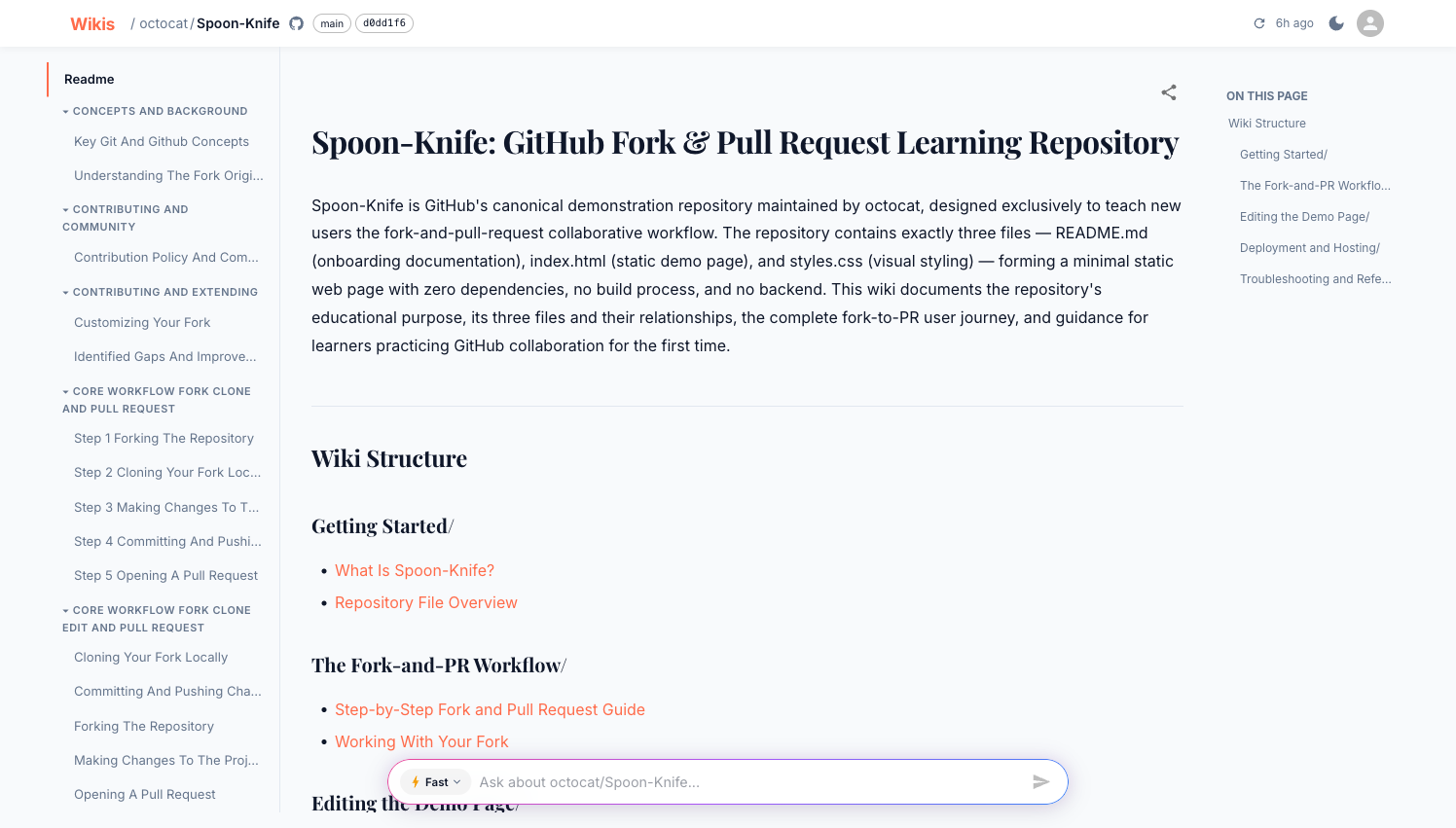
The wiki viewer has three panels:
| Panel | Location | Purpose |
|---|---|---|
| Sidebar | Left | Navigate between pages and sections |
| Content | Center | Rendered markdown with diagrams and code |
| On This Page | Right | Jump to headings within the current page |
The header
The header shows:
- Breadcrumb —
Wikis / owner / repowith links back to the dashboard - Branch badge — the branch this wiki was generated from
- Commit hash — links to the exact commit on GitHub/GitLab
- ↺ Refresh — re-generate the wiki (owner only)
- Indexed timestamp — when the wiki was last generated
Sidebar navigation
Pages are grouped into sections. Click a section header to collapse or expand it. The currently active page is highlighted.
On mobile, the sidebar collapses into a drawer. Tap the menu icon in the top-left to open it.
Page content
Wiki pages are rendered GitHub-flavoured Markdown with:
Syntax-highlighted code blocks
Every code block shows the language and a Copy button.
def generate_wiki(repo_url: str, branch: str = "main") -> str:
    """Kick off wiki generation and return the wiki_id."""
    ...
Mermaid diagrams
Architecture diagrams, sequence diagrams, and flowcharts are embedded as interactive SVGs:
graph LR
    A[Clone repo] --> B[Parse files]
    B --> C[Build index]
    C --> D[Generate pages]
    D --> E[Browsable wiki]
Internal links
Links between wiki pages navigate within the viewer — no full page reload.
Tables
Capability tables and API references are rendered as styled HTML tables.
On This Page
The right-hand On This Page panel lists every heading on the current page. Click any entry to scroll directly to that section. The panel stays fixed as you scroll.
Sharing a page link
Click the share icon (↗) in the top-right corner of any page to copy a direct link. Shared-link recipients must be authenticated to view the wiki.
Keyboard navigation
| Key | Action |
|---|---|
Enter in Ask bar | Submit question |
Shift + Enter | New line in Ask bar |
| Clicking a sidebar item | Navigate to page |
| Clicking a TOC item | Scroll to heading |